
What Is Bandwidth Throttling and How to Stop It
Does your internet suddenly slow down when streaming or downloading large files? You are likely experiencing bandwidth throttling. This occurs when your Internet Service Provider intentionally restricts your connection speed to limit data usage or manage network congestion. Join Axclusive in the article below to learn how to easily detect this frustrating issue and discover proven methods to bypass it and restore your full network performance.
What Is Bandwidth Throttling?
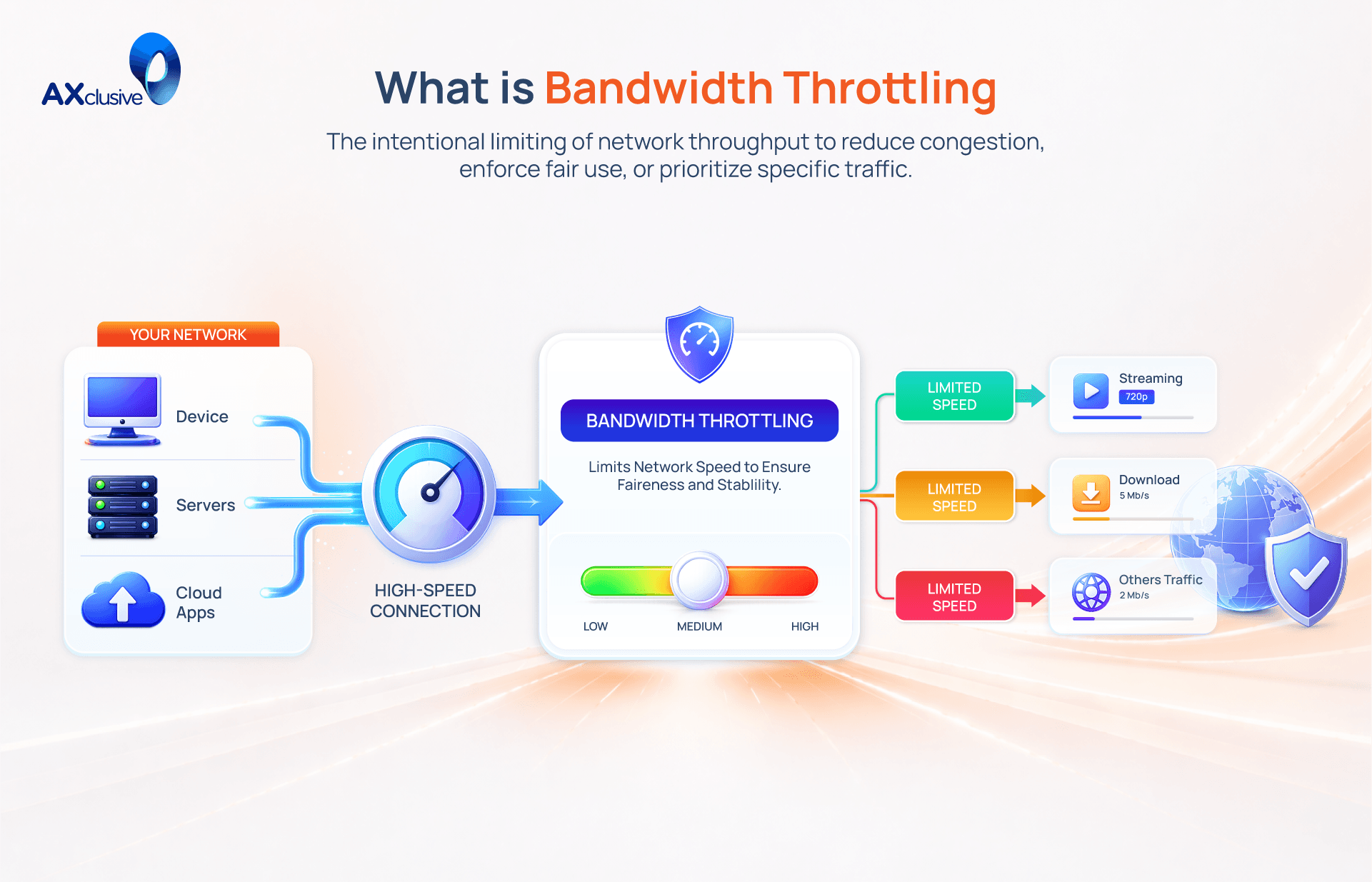
Bandwidth throttling is the intentional restriction of internet communication speeds by an Internet Service Provider (ISP). This process limits the volume of data transmitted over a network during a specific period. While bandwidth represents the total capacity of a connection, throttling artificially reduces this speed to create a digital bottleneck. Users experience this as slow website loading, lagging video streams, or reduced performance in data-heavy applications. ISPs typically implement these constraints to manage high traffic volume or to enforce data caps defined in a service agreement.
Why Bandwidth Throttling Happens
Internet Service Providers (ISPs) implement throttling to manage their infrastructure and control costs. While it may feel like a technical error, it is usually an intentional management strategy. ISPs monitor network performance and user behavior to decide when and where to restrict speeds. Understanding these triggers allows you to adjust your usage or switch to a provider with better policies.
Data Usage Limits
Many internet service agreements include a monthly data cap. This cap represents the total volume of data you can upload or download within a billing cycle. High-bandwidth activities, such as streaming 4K video, downloading large software updates, or frequent video conferencing, consume this allowance rapidly.
When you exceed this limit, the ISP does not typically terminate your connection. Instead, they artificially restrict your throughput to a significantly lower speed. This ensures the connection remains active for basic tasks like email, but makes data-heavy applications unusable. You can check your current usage by logging into your ISP’s customer portal to see if you are approaching your monthly limit.
Peak Network Congestion
Internet infrastructure has finite capacity. During peak usage hours, usually between 7:00 PM and 11:00 PM, the number of active users increases. If the volume of traffic exceeds what the local hardware can handle, the network becomes congested.
To prevent a total system failure or extreme latency, ISPs use throttling to regulate the flow of data. By slowing down every user on a specific node, they ensure the network remains functional for the entire neighborhood. This is most common with cable internet, where bandwidth is shared among households on the same physical line. If your speed consistently drops at the same time every night, congestion is the likely cause.
Traffic Prioritization Policies
Some ISPs use "packet inspection" to see what you are doing online. Based on this information, they apply traffic prioritization policies. They may give priority to their own branded streaming services while slowing down traffic from competing platforms.
In some cases, ISPs target specific types of data, such as peer-to-peer (P2P) file sharing or high-definition video, regardless of the website. They view these activities as a strain on their resources and restrict them to free up bandwidth for other users. These policies often favor services that have paid the ISP for "fast lane" access, creating an inconsistent experience across different parts of the internet.
How to Detect Bandwidth Throttling
Internet Service Providers rarely notify users when they initiate throttling. A sudden drop in speed could be a hardware issue, a temporary network glitch, or an intentional restriction. To determine the exact cause, you must run a comparative test. By hiding your traffic from your ISP, you can see if they are selectively slowing down your connection.
Check Speed with an Internet Test Tool
The first step is establishing a baseline for your current, unencrypted connection. You must measure the exact speed your ISP is currently delivering. Close all background applications, including streaming services and large downloads. Open a reliable browser-based speed test, such as Ookla’s Speedtest.net or Fast.com.
Run the test and record three key metrics: your download speed, upload speed, and ping (latency). For the most accurate baseline, run this test multiple times throughout the day, especially during the evening when you suspect throttling is occurring. Write down these initial numbers.
Test Performance Through a VPN
A Virtual Private Network (VPN) encrypts your internet traffic. This encryption prevents your ISP from seeing what websites you are visiting or what type of data you are downloading. If they cannot identify the traffic, they cannot apply targeted throttling policies to it.
Download and install a reputable, paid VPN service that does not impose its own data caps or artificial speed limits. Open the VPN application and connect to the server located closest to your physical location. Connecting to a distant server naturally increases latency and invalidates the test. Once the secure connection is established, return to the exact same speed test website you used in the first step.
Compare the Results
Run the speed test again while the VPN is active. Record the new download and upload speeds. Now, compare these results to your baseline numbers.
A VPN typically adds a small amount of overhead, which usually results in a slight decrease in speed (around 10-20%). However, if your speed is significantly faster while connected to the VPN, it is a strong indicator of bandwidth throttling. Because the VPN hid your activity, the ISP stopped restricting your speed. If the speeds are identical or slightly slower, your ISP is likely not throttling your connection, and the issue may lie with your local hardware or general network congestion.
How to stop bandwidth throttling
If your diagnostic tests confirm your ISP is artificially limiting your speed, you have a few practical options to restore performance. The right solution depends on why the provider is targeting your connection in the first place. You can either mask your activity, alter how you connect to the internet, or increase your official capacity.
Use a VPN
A Virtual Private Network (VPN) is the most effective tool for bypassing activity-based throttling. ISPs often use Deep Packet Inspection (DPI) to identify and slow down high-bandwidth activities like 4K streaming, torrenting, or online gaming.
When you activate a VPN, it encrypts your entire data stream. The ISP can see that you are downloading data, but they cannot see what the data is or where it is coming from. Because they cannot classify the traffic, their automated throttling filters cannot engage. This instantly restores your speed for those specific activities. However, a VPN cannot bypass a hard data cap or fix physical network congestion in your neighborhood.
Change Your Connection Method
The physical technology delivering your internet heavily influences throttling policies. Cellular networks (4G/5G) and satellite connections have strict capacity limits and are highly susceptible to congestion. ISPs on these networks aggressively throttle users to maintain basic service for everyone during peak hours.
If you consistently experience throttling on a wireless or shared cable connection, switching to a dedicated line is the permanent fix. Fiber-optic internet provides a dedicated, uncontended line directly to your premises. Fiber networks have massive bandwidth capacity, meaning providers rarely need to implement congestion-based throttling, even during the busiest times of the day.
Move to a Higher Data Plan
If your speed suddenly drops to a crawl at the same time every month, you are likely hitting your contractual data cap. ISPs use throttling as a penalty for exceeding your monthly allowance, forcing your connection down to speeds barely suitable for basic web browsing (e.g., 128 Kbps to 1 Mbps).
The only way to stop this specific type of throttling is to adjust your contract. Review your recent bills to see your average monthly usage. If you consistently exceed your limit, upgrade to a higher data tier. Alternatively, search for a provider in your area that offers truly "unlimited data" plans with no hidden throttling clauses in their Acceptable Use Policy (AUP).
You do not have to accept poor internet performance caused by bandwidth throttling. Once you learn how to detect these artificial ISP limits, you can easily bypass them by using a secure VPN, upgrading your data plan, or switching to a dedicated fiber connection. Axclusive trusts this guide has provided the practical steps you need to stop network slowdowns and permanently secure the fast, reliable internet speeds you deserve.
Stop bandwidth throttling and boost your internet performance. Contact us to optimize your network and ensure faster, more stable connectivity