
VoIP Call Quality Tips to Improve Business Calls
Clear and reliable communication depends heavily on strong VoIP Call Quality. Factors such as latency, jitter, packet loss, and network performance can directly affect voice clarity and user experience. In this article, Axclusive ISP explores the key factors that influence VoIP Call Quality and practical ways to improve call performance for modern business communications.
VoIP Call Quality Influencing Factors
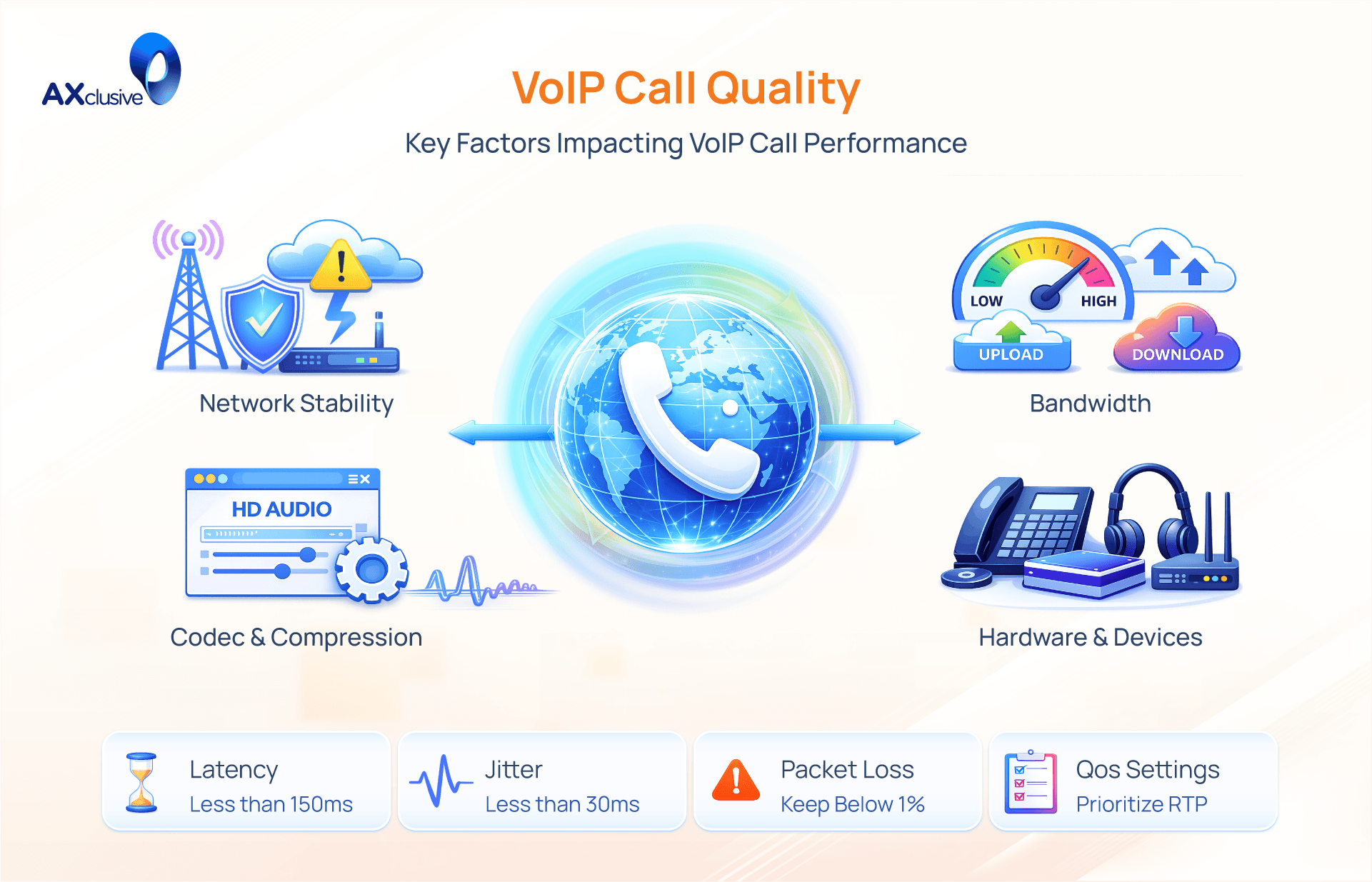
Understanding the technical elements that impact your VoIP performance is crucial for maintaining crystal-clear communications. Here are the primary factors that dictate your call quality and how to optimize them:
Latency (Delay): This is the time it takes for your voice to reach the listener. High latency causes awkward conversational pauses and overlapping speech. For a natural conversation, latency should be kept under 150 milliseconds. Solution: Ensure a fast, stable internet connection.
Packet Loss: Voice data travels in digital "packets." If packets drop during transmission, you will experience missing words or silent gaps. Acceptable packet loss for VoIP is below 5%. Solution: Switch from a wireless connection to a wired Ethernet cable and inspect your network hardware.
Jitter: When data packets arrive at irregular intervals, it results in scrambled, "robotic" audio. Jitter levels should remain below 30 milliseconds. Solution: Avoid large file downloads during calls and prioritize wired connections to reduce signal interference.
Network Congestion: Similar to a traffic jam, too much network activity at once will choke your bandwidth and degrade voice quality. Solution: Upgrade your router and configure Quality of Service (QoS) settings to prioritize VoIP traffic over regular web browsing.
Hardware and Software Performance: An overloaded processor or outdated software can struggle to encode audio efficiently, leading to poor call performance. Solution: Keep your operating system and communication apps updated, and ensure your device has adequate processing power.
Audio Equipment and Environment: Background noise and poor-quality hardware can ruin a call, even on a perfect network. Built-in computer microphones often capture unwanted echoes. Solution: Conduct calls in a quiet environment and invest in a dedicated, noise-canceling headset.
Ways to Improve VoIP Call Quality
Achieving crystal-clear VoIP communications requires a combination of network optimization, proper hardware configuration, and a conducive physical environment. Here are the most effective steps to enhance your call quality:
Optimize Network Traffic with QoS: Configure your router's Quality of Service (QoS) settings to prioritize voice traffic over standard internet activities. This ensures that data-heavy tasks (like file downloads) do not cause latency or jitter during your conversations.
Configure Hardware and Firewalls Properly: Ensure your network infrastructure—routers, switches, and VoIP phones—is fully compatible. Enter the precise SIP settings provided by your carrier, configure your firewall to allow VoIP traffic without interference, and consistently update your device firmware to prevent dropped calls.
Leverage Advanced VoIP Features: Take advantage of modern communication capabilities like HD Voice, which utilizes a wider audio bandwidth for superior sound clarity. Additionally, use platforms with AI integration that can dynamically adjust call settings based on real-time network conditions.
Control Your Physical Environment: Background noise and poor room acoustics can ruin an otherwise perfect connection. Improve clarity by using high-quality noise-canceling microphones and taking calls in quiet spaces, ideally with sound-absorbing materials.
Choose a Reliable VoIP Provider: Your call quality is only as good as your carrier's infrastructure. Partner with a VoIP provider that offers comprehensive technical support, redundant servers, and the right balance of advanced features to meet your business needs.
Troubleshooting VoIP Call Quality Issues
Once you have detected a drop in communication performance, a systematic troubleshooting approach is essential to restore system stability. Follow these core steps to resolve VoIP issues efficiently:
Run Network Diagnostics: Utilize network monitoring tools to pinpoint the exact technical fault. Determine whether the disruption is caused by high latency, excessive jitter, or dropped data packets.
Verify Network Configuration: Check your router and firewall settings to ensure Quality of Service (QoS) rules are correctly applied and actively prioritizing VoIP traffic over standard web browsing.
Inspect Hardware Integrity: Confirm that your network switches, IP phones, and headsets are functioning properly, undamaged, and fully compatible with your current VoIP infrastructure.
Apply Software and Firmware Updates: Outdated systems frequently trigger performance bugs. Ensure your VoIP applications, operating systems, and hardware firmware are running the latest versions.
Address Environmental Interference: Do not overlook physical audio disruptions. Eliminate background noise and echo by moving to a quieter space and using a high-quality, noise-canceling headset.
VoIP Call Quality FAQ
How Does a VoIP Call Quality Test Work?
A VoIP call quality test measures how voice data performs over a network. It analyzes key metrics such as latency, jitter, packet loss, and sometimes MOS (Mean Opinion Score). These results help identify network issues that may cause poor audio, delays, or dropped calls.
What Causes Jitter in VoIP Calls?
Jitter in VoIP calls is caused by inconsistent packet delivery. Common reasons include network congestion, unstable internet connections, wireless interference, insufficient bandwidth, and lack of traffic prioritization for voice data.
How Can Small Offices Improve VoIP Call Quality?
Small offices can improve VoIP quality by using a stable internet connection, enabling QoS for voice traffic, switching to wired Ethernet, upgrading network hardware, and reducing unnecessary bandwidth usage during business hours.
How to Maintain Consistent Call Quality with VoIP?
Consistent VoIP call quality is achieved through regular network monitoring, proper QoS configuration, sufficient bandwidth planning, reliable hardware, and separating voice traffic from general data usage.
In conclusion, maintaining superior VoIP call quality requires more than just a fast internet connection; it demands a proactive approach to network management. By monitoring critical metrics like latency and jitter, and implementing the practical hardware and software optimizations outlined in this guide, businesses can effectively eliminate audio disruptions. Axclusive hopes this comprehensive resource empowers you to secure a stable communication infrastructure, ensuring every call remains crisp, clear, and professional.
Contact us today to improve your VoIP call quality and ensure reliable business communication.