
How to Calculate VoIP Bandwidth for Your Network
Maintaining professional audio quality starts with managing your VoIP Bandwidth effectively. To avoid distorted sound or dropped calls, it is essential to understand your network’s actual capacity needs. Join Axclusive as we explore bandwidth requirements and share practical tips to save and optimize your data usage for seamless communication.
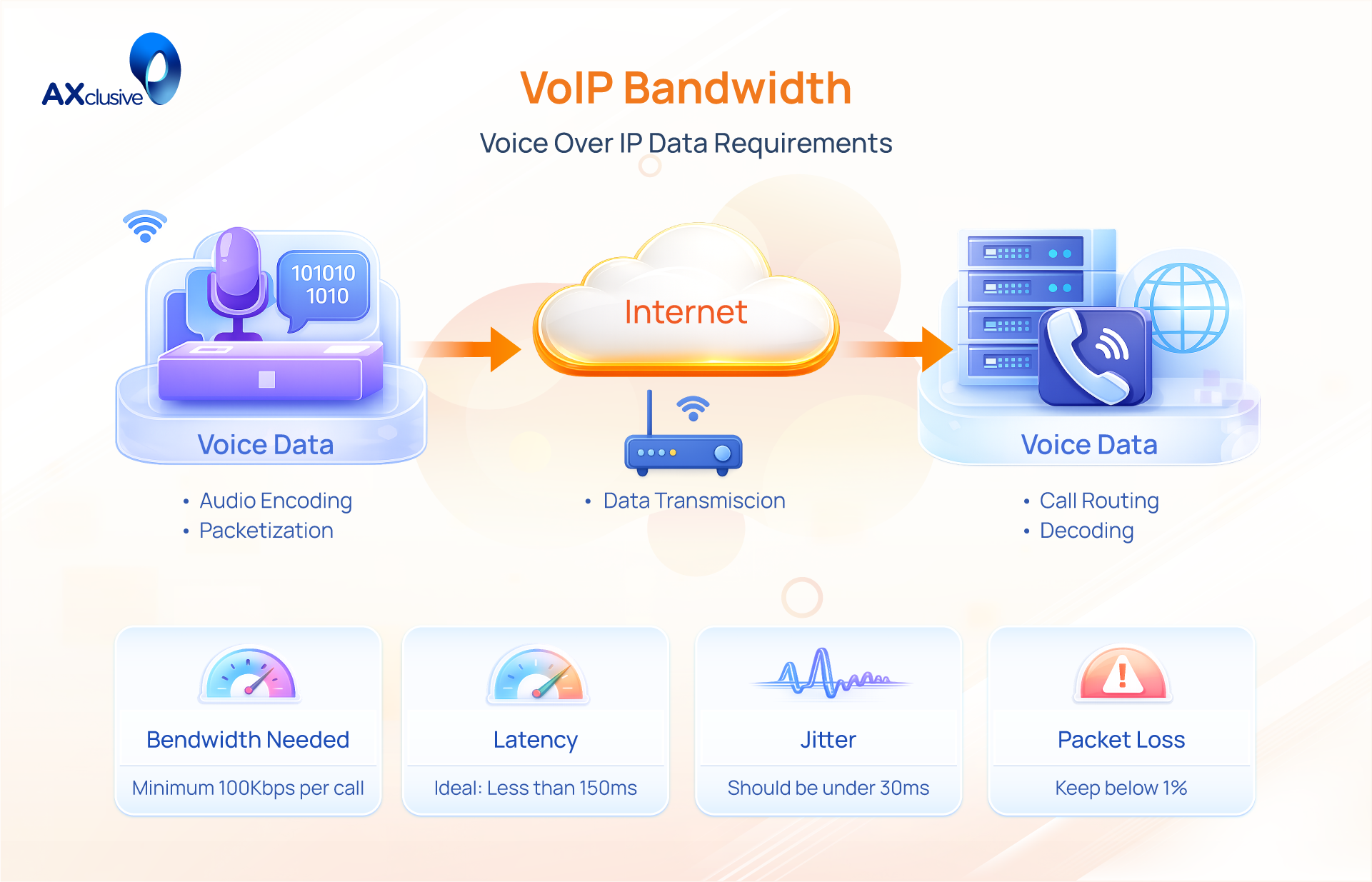
How VoIP Bandwidth Is Used During Calls
Each voice segment is broken into small units called data packets. These packets include “overhead” information, such as source and destination IP addresses. The total voip bandwidth consumption consists of both the compressed audio and this administrative overhead. Because headers add size to every packet, the actual bandwidth used is always higher than the raw audio bit rate.
Transmission occurs in real-time using the User Datagram Protocol (UDP). This protocol prioritizes speed over reliability to prevent lag. VoIP requires a continuous, bi-directional flow of data. To maintain clear audio, your network must have enough capacity to handle the data you send (upload) and the data you receive (download) simultaneously. If the bandwidth for voip calls is insufficient or unstable, the system will drop packets, resulting in distorted audio or disconnected calls.
How to Calculate Your VoIP Bandwidth Requirements
Calculating VoIP bandwidth is essential for professional audio quality. You must account for voice codecs, network overhead, and peak concurrent calls. Since VoIP is sensitive to bandwidth fluctuations, exceeding your upload capacity leads to lag and dropped calls. This guide helps you provision sufficient network capacity for peak business hours.
Selecting the Voice Codec
Codecs are the algorithms that compress and decompress digital voice data. Your choice of codec determines the baseline bandwidth for voip calls.
- G.711: The industry standard for high-quality, uncompressed audio. It provides the best clarity but requires the most data.
- G.729: A high-compression codec designed for limited bandwidth environments. It uses significantly less data by sacrificing some audio richness.
- Opus: A modern, flexible codec that adapts to real-time network conditions. It balances high-quality sound with efficient data usage.
Measuring Bandwidth per Call
The total bandwidth used by a single call consists of the raw voice payload plus network overhead. This overhead includes the IP, UDP, and RTP headers required to route the data. These headers add approximately 16 Kbps to every call.
Typical requirements per call including overhead:
- G.711: ~80 Kbps (64 Kbps voice + 16 Kbps overhead).
- G.729: ~24 Kbps (8 Kbps voice + 16 Kbps overhead).
- Opus: ~40 Kbps (average usage).
Always base your calculations on the total figure (Voice + Overhead) to avoid under-provisioning your network.
Estimating Simultaneous Call Volume
To determine your total network load, identify the maximum number of concurrent calls your business supports during its busiest hour. This is rarely equal to your total number of employees.
- Standard Office: Typically follows a 1:3 or 1:4 ratio (e.g., 30 employees might result in 10 concurrent calls).
- Call Centers/Sales Teams: Often require a 1:1 ratio where every staff member is active simultaneously.
Analyze your historical call logs to find your peak “Simultaneous Call” metric. This ensures your network handles the highest possible traffic without audio degradation.
Calculating Total VoIP Bandwidth Needs
Use this standard formula to find your minimum requirement:
Total Bandwidth = (Bandwidth Per Call + Overhead) x Number of Concurrent Calls.
For example, if you use the G.711 codec (80 Kbps) for 20 concurrent calls:
80 Kbps x 20 = 1,600 Kbps (or 1.6 Mbps).
| Concurrent Calls | G.711 (80 Kbps) | G.729 (10 Kbps) |
|---|---|---|
| 10 Calls | 0.8 Mbps | 0.1 Mbps |
| 20 Calls | 1.6 Mbps | 0.2 Mbps |
| 50 Calls | 4.0 Mbps | 0.5 Mbps |
| 100 Calls | 8.0 Mbps | 1.0 Mbps |
Key Factors That Affect VoIP Bandwidth
Maintaining a high-speed internet plan does not guarantee perfect audio. The performance of your VoIP bandwidth depends on the consistency and health of your entire network path. Even with significant capacity, specific technical issues can degrade a call until it becomes unusable. Understanding these variables allows you to stabilize your connection and protect your communication.
Network Congestion Levels
Network congestion occurs when data demand exceeds the capacity of the link. Like a traffic jam, when too many devices use the same connection, data packets slow down. This leads to audible delays and “choppy” sound because your voice packets must wait in a queue behind other traffic.
Practical Fix: Use a wired Ethernet cable instead of Wi-Fi. This eliminates radio interference from other electronics. If you work in a shared environment, avoid placing important calls during peak hours when others are streaming video or performing large backups.
Jitter and Packet Loss Conditions
Jitter is the irregular timing of data packet arrivals. Packet loss happens when voice data fails to reach the destination entirely. Both issues severely damage the flow of conversation, causing robotic voices or missing words. These conditions are often caused by unstable internet links or failing network hardware.
Practical Fix: Restrict bandwidth-heavy applications, such as high-definition streaming or software updates, while you are on a call. You can also use router settings to limit the bandwidth available to non-essential devices. If the problem continues, ask your ISP to test your line for signal noise.
Network and Hardware Constraints
Your router and security settings act as the gatekeepers for your VoIP bandwidth. Outdated hardware often lacks the processing power to manage multiple real-time voice streams. Additionally, security features like firewalls may incorrectly flag voice traffic as a threat and block the connection.
Practical Fix: Keep your router firmware updated to ensure optimal performance. If you experience “one-way audio,” check your router’s NAT (Network Address Translation) settings. You may need to enable NAT Traversal or configure a “STUN” server with your provider’s help to ensure voice packets bypass security bottlenecks correctly.
How to Optimize VoIP Bandwidth Usage
Strategic optimization keeps your communication professional and reliable. You must balance audio quality with data efficiency to avoid network strain. By refining how your system handles data, you can support more users on the same connection. The following methods provide a practical roadmap for enhancing your bandwidth for voip calls.
Choosing Efficient Codecs
Select a codec based on your network capacity. G.711 offers superior clarity but uses approximately 87 Kbps per call. If bandwidth is limited, use G.729, which compresses audio to roughly 30 Kbps. Modern systems often use Opus, an adaptive codec that adjusts its data usage in real-time. This ensures the call stays connected even when speeds fluctuate, making it ideal for varying network environments.
Applying Advanced Voice Compression
Use silence suppression to reduce data loads. Standard conversations contain up to 50% silence. Silence suppression, or Voice Activity Detection (VAD), stops the transmission of data packets during natural pauses. This technique frees up voip bandwidth for other active users. It allows more simultaneous lines on the same connection without degrading the overall audio quality.
Monitoring Bandwidth Consumption
Track your network traffic to identify bottlenecks. Use specialized software to see which applications consume the most data. If file backups or software updates saturate the network, your VoIP bandwidth will suffer. Monitoring allows you to spot these trends and adjust your schedule. Accurate data helps you decide when it is time to upgrade your internet plan or adjust your usage policies.
Managing and Prioritizing Traffic
Implement Quality of Service (QoS) on your router. This is the most practical step for any business. QoS rules tell your hardware to process voice packets before web browsing or downloads. Even if the network is busy, your calls remain clear because they bypass the queue. This prioritization protects your bandwidth for voip calls from being crowded out by less urgent data activities.
Managing your VoIP Bandwidth correctly ensures that your business communication remains clear and professional. By following the calculation steps and optimization tips shared by Axclusive, you can prevent common call quality issues and maintain a high-performance network. Proper bandwidth planning is the foundation of a reliable and scalable internet phone system.
📞 Contact us today to optimise your VoIP bandwidth and ensure clear, stable business communication.
Back to blog