
What Is Packet Loss? How to Detect and Reduce It
Experiencing lag in online games or unstable video calls often points to packet loss. Packet loss occurs when data packets fail to reach their destination during transmission. Together with Axclusive ISP, explore this topic in the article below.
What is packet loss
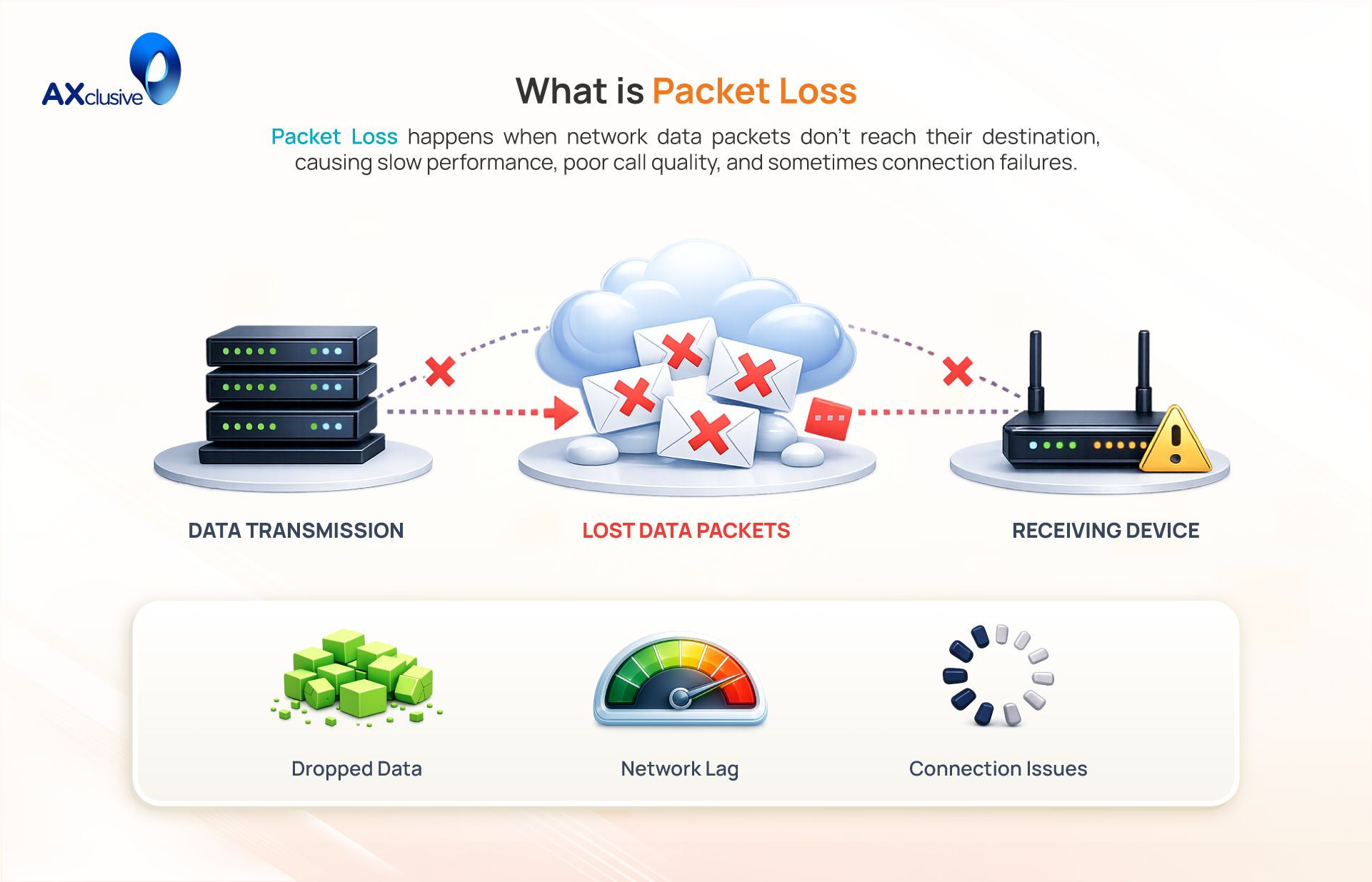
Packet loss is a common network issue where one or more units of data, known as packets, fail to reach their destination. All data transmitted over the internet is segmented into these packets for efficient routing. When this occurs, reliable protocols like TCP must retransmit the missing packets, which ensures data integrity but introduces latency and slows down performance. For real-time applications like video conferencing or online gaming that use UDP, lost packets are not retransmitted, resulting in tangible issues like stuttering audio, frozen video, or in-game lag.
Common Causes of Packet Loss
Packet loss is a symptom, not a singular problem, and it can be triggered by a wide range of issues. The root cause can exist on your local network, within your Internet Service Provider’s infrastructure, or on the broader internet backbone. Understanding these potential points of failure is the first step toward diagnosing and resolving the issue.
Network Traffic Congestion
This is the most frequent cause of packet loss. Network congestion occurs when a link or a network device receives more data than it can process. Similar to a highway during rush hour, when traffic exceeds capacity, everything slows down. Network routers have memory buffers (queues) to hold packets temporarily during brief traffic spikes. However, if the congestion is sustained and these buffers fill up, the router has no option but to start dropping new incoming packets. This is an intentional mechanism to prevent the device from crashing.
Network Hardware Failures
Every packet travels through physical hardware, and a failure in any component can cause packet loss. This includes aging routers, faulty network switches, overheating modems, and even damaged Ethernet cables. Degraded internal components can lead to processing errors, causing a device to intermittently drop packets it cannot handle. A loose or damaged cable can corrupt the data signal, leading the receiving end to discard the malformed packet.
Software Errors and Bugs
The software that runs on network devices (firmware) or your computer (network drivers) can also be the culprit. A bug in a router’s firmware can cause a memory leak or inefficient traffic handling, leading to dropped packets once the device’s resources are exhausted. Similarly, an outdated or corrupted network driver on your computer can create communication errors between your operating system and its network card, resulting in packet loss.
Security Threats and Attacks
Packet loss can be a deliberate outcome of a malicious attack. In a Distributed Denial of Service (DDoS) attack, an attacker floods a target with an overwhelming volume of junk traffic. The target’s network equipment becomes so saturated that it begins dropping both malicious and legitimate packets, effectively taking the service offline for real users. A less common but direct attack, a “packet drop attack,” involves a compromised router being instructed to discard packets intentionally.
Overloaded Network Devices
A device’s processing capacity can be a bottleneck, even if the network connection itself is not congested. Routers have CPUs, and every packet requires a small amount of processing power. If a router’s CPU hits 100% utilization due to a high number of connections (like from P2P file sharing) or complex firewall rules, it may not have the capacity to process all incoming packets. In this state, it will start dropping packets it cannot handle, regardless of the available bandwidth.
Wired Versus Wireless Limitations
Wireless networks (Wi-Fi) are inherently less reliable than wired Ethernet connections. Wi-Fi signals are radio waves, which are susceptible to interference from other electronic devices, such as microwave ovens, cordless phones, and even neighboring Wi-Fi networks. This interference can corrupt data in transit, causing the receiving device to discard the packet. Physical distance and obstructions like walls also weaken the signal, increasing the probability of packet loss.
Incorrect Network Configuration
Human error in network settings can directly cause packet loss. A misconfigured firewall rule might be too strict, causing it to block and drop legitimate traffic from an application or game. Similarly, mismatched MTU (Maximum Transmission Unit) settings between devices can lead to fragmentation problems. In corporate environments, an incorrect VLAN configuration could send packets to a segment where they have no destination, causing them to be dropped.
How to Reduce Packet Loss
Troubleshooting packet loss requires a methodical approach, as a complete elimination of the issue is not always possible. The goal is to significantly reduce it by addressing the most common points of failure. The most effective methods to reduce packet loss involve a process of elimination, starting with the simplest solutions before moving to more complex fixes. This involves checking physical connections, optimizing software, and, if necessary, upgrading hardware.
Restarting Network Systems
A simple power cycle is the most effective first step in troubleshooting. Rebooting your modem, router, and affected devices clears temporary software glitches, memory leaks, and overloaded processes that can cause packet loss. This action resets the hardware to a clean operational state and re-establishes a fresh connection to your Internet Service Provider. To do this correctly, unplug your modem and router, wait 60 seconds, plug the modem back in first, wait for it to fully connect, and then plug the router back in.
Inspecting Network Connections
Packet loss often originates from a faulty physical connection. A loose, damaged, or low-quality Ethernet cable can corrupt data signals, causing packets to be dropped. Methodically check that all network cables are securely clicked into their ports on your computer, router, and wall jacks. Inspect the cables for visible damage like kinks or frayed wires, and ensure the plastic locking tabs on the connectors are intact. If you suspect a faulty cable, test the connection with a new one to see if the issue is resolved.
Using Wired Connections Instead of Wi-Fi
For any activity sensitive to packet loss, such as online gaming or video conferencing, switching to a wired Ethernet connection is the most reliable fix. Wi-Fi is inherently susceptible to signal interference from other electronics and physical obstructions, which directly causes a higher rate of dropped packets. An Ethernet cable provides a stable, dedicated physical path for data, eliminating these environmental variables and ensuring a more consistent, low-latency connection.
Updating or Upgrading Software
Outdated software is a common, and often overlooked, cause of packet loss. Bugs in your router’s firmware or your computer’s network drivers can lead to inefficient traffic handling. Manufacturers regularly release updates that patch these bugs and improve performance. Ensure your router has the latest firmware by checking its administrative settings. Likewise, update the network drivers for your computer by downloading the latest version directly from the hardware manufacturer’s website.
Replacing Outdated Hardware
If other troubleshooting steps fail, the problem may be the hardware itself. Network equipment degrades over time, and older routers often lack the processing power to handle modern internet speeds and the demands of multiple connected devices. An overloaded router CPU will cause the device to drop packets it cannot process. If your router is more than five years old or its CPU usage is consistently maxed out, replacing it with a modern device is often the best long-term solution.
Applying Quality of Service Controls
Quality of Service (QoS) is a router feature designed to mitigate packet loss caused by local network congestion. It allows you to prioritize specific types of traffic. You can configure QoS to give preferential treatment to applications like gaming or video conferencing. When your network becomes busy, the router will drop packets from low-priority activities (like a background download) before it drops packets from your high-priority applications, ensuring a smoother experience where it matters most.
Enhancing Network Security
A compromised network can be a hidden source of packet loss. A device infected with malware may be generating excessive background traffic as part of a botnet, causing local congestion and overloading your router. Likewise, an unsecured Wi-Fi network allows unauthorized users to connect and consume your bandwidth. To mitigate this, ensure your Wi-Fi is protected with a strong WPA2 or WPA3 password, run regular antivirus scans on all devices, and enable your router’s built-in firewall.
Packet Loss Effects on Network Performance
Packet loss directly degrades network performance by disrupting the consistent flow of data. These disruptions are not just minor inconveniences; they create tangible consequences that affect user experience, application stability, and even business operations.
- Reduced Network Throughput: Throughput is the measure of how much data is successfully transferred over a connection in a given time. When packets are lost, the total volume of usable data that reaches the destination decreases, leading to a direct reduction in overall network throughput.
- Increased Latency and Jitter: For reliable connections using TCP, lost packets must be retransmitted. The time spent waiting for the retransmission to arrive significantly increases latency (delay). This also introduces jitter (the variation in latency), making the connection feel inconsistent and laggy.
- Poor Application Performance: The impact is most severe on real-time applications. In VoIP calls and video conferences, packet loss results in choppy audio and frozen video frames. In online gaming, it causes lag and delayed actions, creating a frustrating and uncompetitive experience.
- Degraded User Experience and Productivity Loss: For businesses, these technical issues translate into operational problems. Slow-loading applications, interrupted file transfers, and unreliable communication tools lead to frustrated users and a direct loss of productivity, as employees are unable to perform tasks efficiently.
Packet loss can impact network performance, but it can be identified and reduced with the right approach. By checking network infrastructure, optimizing configurations, and upgrading hardware when necessary, organizations can improve connection stability and reliability. Through this guide, Axclusive has outlined practical steps to help diagnose and reduce packet loss, supporting a more consistent and dependable network experience.
📡 Contact us today to learn more about what is packet loss and how to reduce packet loss to improve network performance and stability.
Back to blog