
What Is Network Jitter? How It Affects Performance
What is network jitter? It refers to inconsistent packet timing that can disrupt real-time applications such as voice, video, and interactive services. Even with high speeds and low latency, jitter can reduce performance and user experience. Join Axclusive ISP to explore more in the article below.
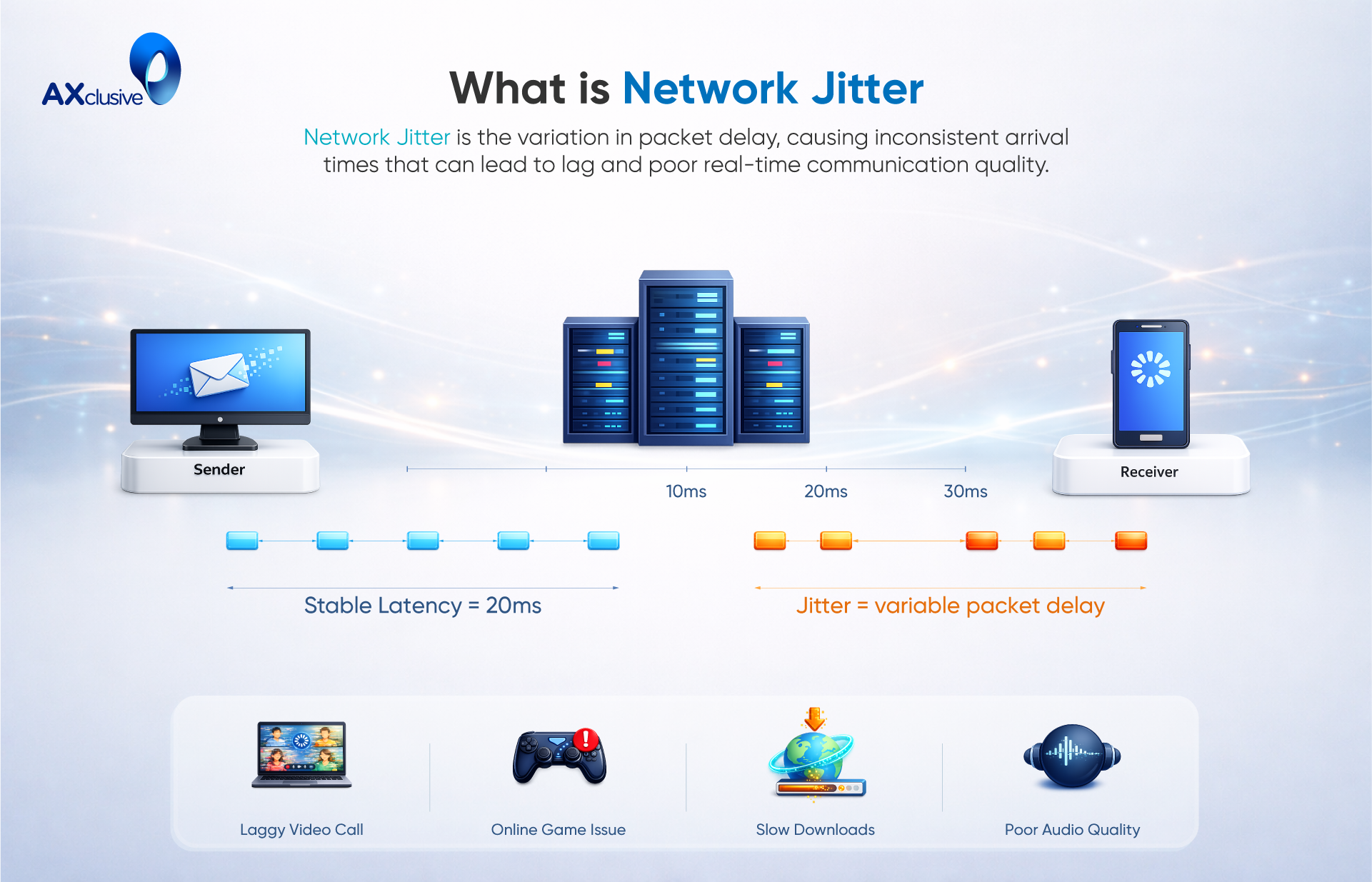
What is network jitter?
In practice, network jitter reflects how unstable packet delivery affects real user experience. When data packets arrive at uneven intervals, applications that rely on steady timing begin to fail. Voice calls may sound broken, video streams can stutter, and interactive systems respond inconsistently. Even when bandwidth and average latency appear acceptable, jitter introduces unpredictability that disrupts performance. This makes network jitter a practical indicator of reliability, especially for real-time and business-critical applications.
What Are the Types of Network Jitter?
Network jitter appears in several common patterns, each affecting applications in different ways. Understanding these types helps teams diagnose issues and choose the right mitigation strategies.
- Constant Jitter: Constant jitter refers to consistent and predictable variations in packet delivery time. Because the fluctuation pattern remains stable, many applications can compensate using buffering or timing adjustments. While performance is not optimal, services such as video calls or online gaming often remain usable under constant jitter conditions.
- Transient Jitter: Transient jitter occurs as sudden and irregular spikes in packet delay. These short-lived disruptions are often caused by temporary congestion, wireless interference, or routing changes. Transient jitter is more noticeable to users, commonly resulting in brief audio dropouts, frozen video frames, or momentary loss of responsiveness.
- Short-TermJitter: Short-term jitter describes very brief timing variations that last only milliseconds. Although the duration is minimal, frequent short-term jitter can still affect user experience, especially in real-time applications. Users may notice quick audio glitches or minor visual stutters during streaming or video communication.
What is acceptable network jitter?
Acceptable network jitter depends on the type of application and how sensitive it is to timing variation. Real-time services require tighter jitter control, while non-interactive data transfers can tolerate higher fluctuation without noticeable impact.
In practice, commonly accepted jitter thresholds include:
- VoIP and voice calls: below 30 ms to maintain clear and natural conversations
- Video conferencing: ideally under 30–50 ms to avoid audio or video distortion
- Online gaming: under 30 ms to ensure responsive gameplay
- Streaming media: up to 100 ms may be acceptable due to buffering mechanisms
- General data transfer: 100 ms or higher often causes no user-visible issues
For stable network performance, jitter below 30 ms is considered optimal. Packet loss should remain under 1%, and one-way latency should stay below 150 ms.
Jitter can be evaluated using repeated ping measurements by comparing variations between round-trip times. This method helps identify timing instability that average latency alone may not reveal.
What Can Lead to Network Jitter
Network jitter occurs when data packets arrive at inconsistent intervals instead of a steady, predictable flow. This variation is rarely caused by a single issue. In most environments, jitter results from multiple network conditions interacting at the same time. Identifying these factors allows network teams to reduce instability and protect real-time applications such as voice, video, and interactive services.
Bandwidth Constraints
Bandwidth defines how much data a network can carry at any given time. When sufficient bandwidth is available, packets move through the network without delay, which keeps delivery times consistent.
When bandwidth becomes limited, packets compete for transmission. This congestion forces packets to queue or wait, creating uneven arrival times. During peak usage periods or in networks with many connected devices, insufficient bandwidth is a common source of jitter.
Latency Fluctuations
Latency reflects how long data takes to travel across a network. Stable latency supports predictable packet delivery, which helps reduce jitter.
When latency varies due to routing changes, congestion, or overloaded devices, packet timing becomes inconsistent. These fluctuations increase jitter even if average latency appears acceptable. Real-time applications are especially sensitive to these variations.
Packet Loss and Recovery
Packet loss disrupts normal data flow. When packets fail to reach their destination, the network must resend them. These retransmissions arrive later than expected, creating timing gaps between packets.
While modern networks can recover from packet loss, frequent retransmissions increase jitter. This effect becomes more noticeable in voice, video, and streaming services where consistent timing matters more than raw speed.
Quality of Service Limitations
Quality of Service (QoS) mechanisms control how traffic is prioritized across a network. When QoS is properly configured, time-sensitive traffic such as VoIP or video receives priority over less critical data.
Without effective QoS policies, all traffic competes equally for network resources. During congestion, real-time packets may be delayed or queued behind bulk data transfers, increasing jitter. Many organizations address this risk through QoS policies defined in service level agreements to maintain predictable performance.
How to Resolve Network Jitter Problems
Network jitter rarely has a single cause, which makes resolution a structured process rather than a one-step fix. Effective mitigation focuses on stabilizing packet delivery, controlling traffic flow, and ensuring the network has enough capacity to handle real-time workloads. By addressing congestion, visibility, prioritization, and bandwidth planning, organizations can significantly reduce jitter and improve overall network reliability.
Reducing Network Congestion
Network congestion occurs when traffic demand exceeds available capacity, causing packets to queue or arrive out of sequence. Reducing congestion starts with identifying non-essential traffic that consumes bandwidth during critical periods.
Limiting high-bandwidth activities such as streaming, large file transfers, or non-business applications during work hours helps stabilize packet flow. Scheduling system updates, backups, and software downloads outside peak usage times also frees capacity for real-time services like voice and video. These steps reduce sudden traffic spikes that often trigger jitter.
Monitoring and Analyzing Network Traffic
Continuous visibility is essential for managing jitter. Network monitoring tools track traffic patterns, device usage, and application behavior across wired, wireless, and cloud environments.
By analyzing this data, teams can identify which users, devices, or services consume disproportionate bandwidth or introduce instability. Regular traffic analysis also helps detect interference issues, misconfigured devices, or overloaded links before they affect real-time performance. Consistent monitoring turns jitter management from reactive troubleshooting into proactive control.
Prioritizing Critical Traffic
Not all network traffic has equal importance. Real-time applications such as VoIP, video conferencing, and interactive services depend on predictable packet delivery.
Traffic prioritization techniques, commonly implemented through Quality of Service (QoS) policies, ensure critical packets move ahead of less time-sensitive data. By reserving bandwidth for priority applications and limiting background traffic, networks maintain consistent delivery times and reduce packet variation that causes jitter.
Expanding Available Bandwidth
In environments where demand continues to grow, adding bandwidth may be necessary. Increasing available capacity allows the network to handle more data and devices without congestion.
While bandwidth expansion alone does not solve all jitter issues, it reduces pressure on existing links and provides greater tolerance for traffic spikes. Combined with traffic control and monitoring, adequate bandwidth supports stable, low-jitter performance across the network.
How Network Jitter Impacts Performance
Network jitter directly affects how reliably applications deliver data over time, with the strongest impact on real-time and interactive systems. When data packets arrive at irregular intervals, applications struggle to maintain smooth and predictable performance.
For voice communication, jitter results in inconsistent audio delivery. Users may hear clipped words, distorted sound, or brief silences during calls. Because speech relies on precise timing, even minor variations in packet arrival can reduce call quality and make conversations harder to understand.
Video conferencing experiences similar issues but at a larger scale. Jitter forces systems to buffer packets to restore order, which can introduce additional delay. This often leads to frozen video frames, audio that no longer matches lip movement, and sudden drops in visual quality during live meetings.
Online gaming is especially sensitive to jitter. Irregular packet timing affects how quickly player actions are processed and displayed. This can cause delayed responses, sudden character movement, or inconsistent gameplay, making competitive gaming unreliable.
Over time, persistent jitter affects more than just technical performance. Users lose confidence in communication tools, collaboration slows, and service quality suffers. In environments such as healthcare, financial trading, or customer support, unstable real-time connectivity can lead to operational risk and reduced service effectiveness.
Network Jitter FAQ
What is the difference between network jitter and ping?
Ping measures the time it takes for a data packet to travel to a destination and return, usually expressed in milliseconds. Network jitter, by contrast, measures the variation in ping over time. A stable ping with little variation indicates low jitter, while fluctuating ping values signal high jitter, which can disrupt real-time applications.
How does network jitter differ from latency?
Latency refers to the overall delay between sending data and receiving a response. Network jitter focuses on how consistent that delay is. Even with low latency, high jitter can cause issues such as choppy audio or unstable video because packets arrive at irregular intervals.
Is a jitter value of 4 ms considered acceptable?
Yes. A jitter value of 4 milliseconds is generally considered very good for most applications. VoIP calls, video conferencing, and online gaming typically perform well when jitter remains below 30 ms.
Can network jitter impact overall internet speed?
Network jitter does not directly reduce bandwidth or raw internet speed. However, high jitter can degrade perceived performance, especially for real-time services like video calls, streaming, and gaming. In severe cases, jitter can make a fast connection feel slow or unreliable.
In summary, network jitter plays a critical role in the stability and reliability of modern networks. Understanding its causes, impact, and acceptable thresholds helps organizations protect real-time applications and user experience. Through the article above, Axclusive has outlined practical insights and strategies to identify, manage, and reduce network jitter for more predictable and resilient network performance.
Back to blog